
The amendment landed in my inbox at 2:14 PM on a Thursday. Two hundred and twelve pages. CUI-marked across the header of every single one.
Inside: revised evaluation criteria, updated technical requirements, a restructured pricing format, and seventeen pages of changes to the statement of work. The proposal team needed an impact assessment by Monday morning. That meant someone had to read every page, identify what changed, map those changes to our existing compliance matrix, and flag anything that would blow up our technical approach or cost model.
I finished before dinner.
Here's the thing about CUI—Controlled Unclassified Information, the classification tier that covers most sensitive-but-not-classified government data—it can't leave your network. No uploading to the everyday commercial AI platforms. No cloud processing. No sending it anywhere that might create a compliance problem down the road. The rules exist for good reason, and anyone who's been through a security audit knows that "I thought it would be fine" is not a defense.
So the obvious solution is off the table. You can't just feed the document to an AI and ask for a summary.
But you can do something else.
Most people think of AI as a destination. You send your document somewhere, it processes the content, it sends back results. That model is fundamentally incompatible with handling classified or controlled data. The moment sensitive information leaves your machine, you've created a problem.
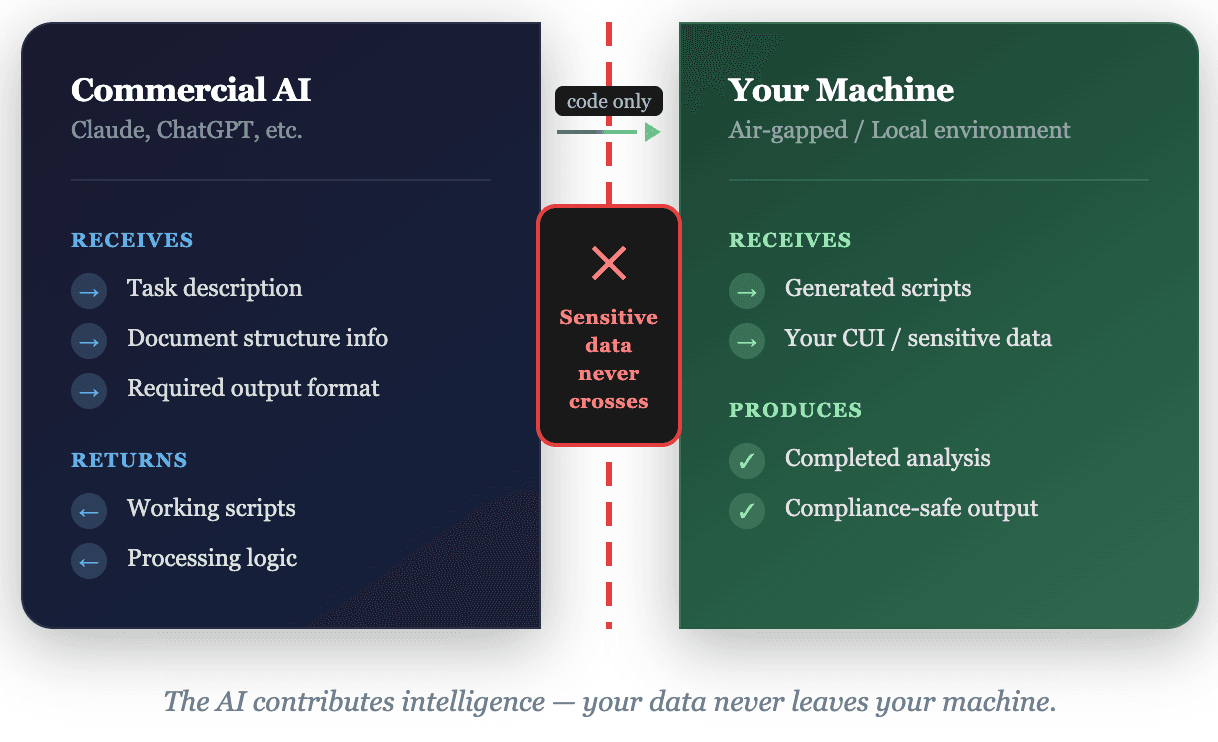
There's another model. Instead of sending your data to an AI, you use AI to build tools that run locally. The AI never sees your sensitive content. It only sees your description of what you need to accomplish.
This isn't a loophole. It's a legitimate architectural pattern that separates the intelligence—the script logic—from the data. The script runs on your machine. Your files never leave your control. The AI's contribution is the code itself, not the processing of your content.
AI contributes code, never sees your data
The practical difference is enormous.
This approach—using AI to generate tools rather than process data—is how I handled that 212-page amendment. Custom Python scripts built in real-time to extract requirements, parse tables, and generate analysis outputs. Everything ran locally. No security violations, no data exposure risk, full compliance with CUI handling requirements.
If you're working with controlled data and wondering how AI fits into your workflow, this is the answer: AI as toolmaker, not data processor.
Topics

Josh Parker
Founder of Indy-Pendent Solutions and flowState Software. Former Air Force combat rescue pilot, defense program manager, and capture strategist with 20+ years in defense acquisition.
Need help with your next capture?
Our software tools can help you win more government contracts.